
Status and avatars
The status message
Section titled “The status message”The bot keeps a #dashboard channel at the top of your server, outside any category.
It holds one message from the bot, and the message updates itself.
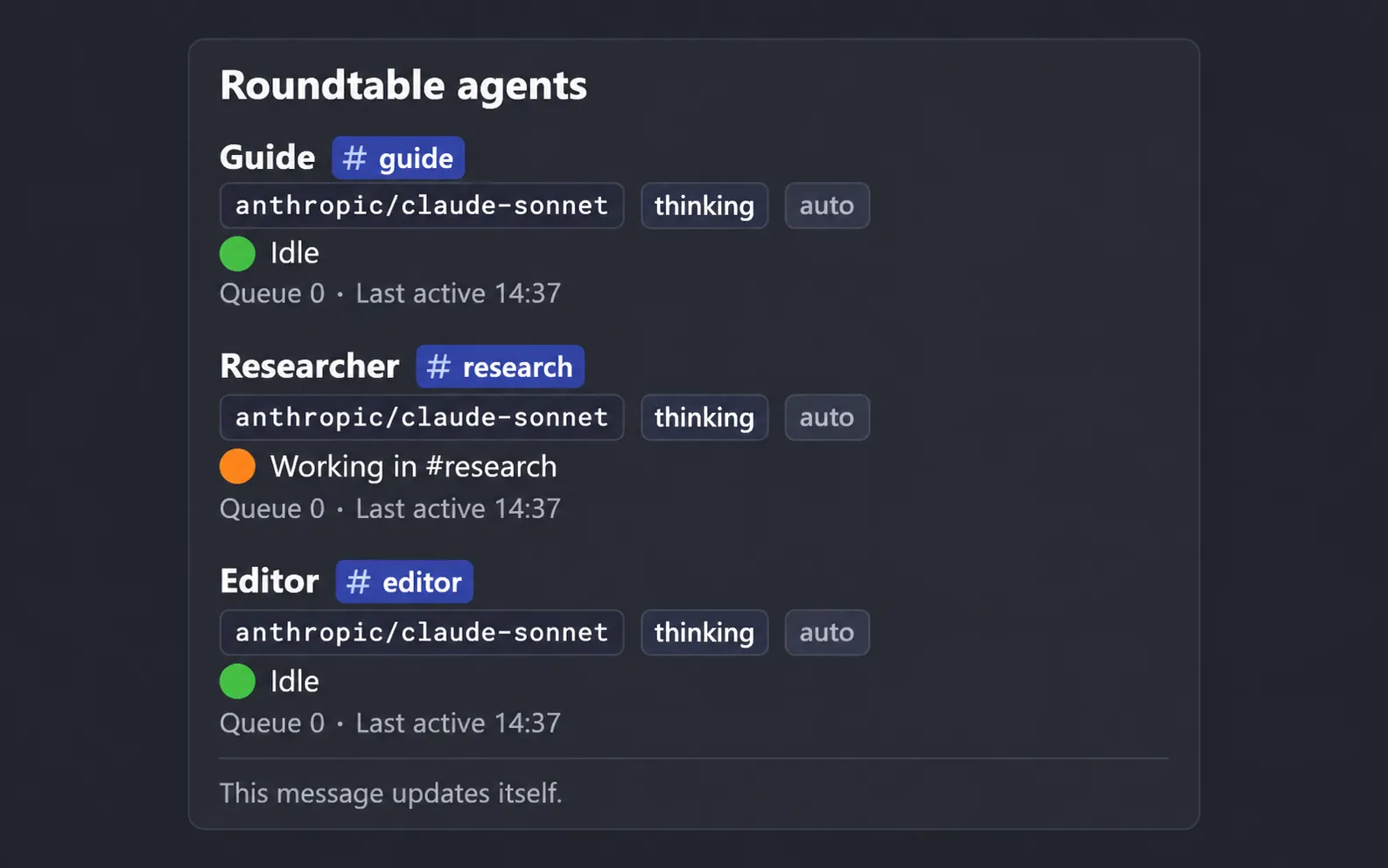
The bot finds the message again after a restart and makes a new one if you delete it. It pins the message when the bot has the Pin Messages permission; without it the message still works, and the bot logs a warning once.
What it shows
Section titled “What it shows”Under the title there is an “Updated” time, in your configured time zone, and any lines that plugins add.
Each active agent has a block with:
- Its display name and a link to its channel.
- Its model and thinking level.
- Its state:
Idle,Workingwith the channel it works in, or a count of queued messages. A queue is shown next to Working, as in “2 queued”. - How much of its context window is used, such as
context 12k / 200k (6%). Right after the context is compacted it says so, and the figure returns at the next turn. - How many schedules it has, and when it was last active, or “No activity since startup”.
Each active group has its display name, a link to its channel, its members and host, whether it is idle or has replies in progress, and its last activity.
When a list is too long for one Discord message, the block ends with a count of the entries that were left out. Archived agents and groups are not listed.
When it refreshes
Section titled “When it refreshes”The message updates when something changes, such as a turn starting or ending or an agent being created, and Discord limits message edits, so it edits at most once every 10 seconds. It also refreshes every 5 minutes, so the last-activity times and the context figures stay current.
Avatars
Section titled “Avatars”Each agent speaks in Discord under its own name and picture.
Where the picture comes from depends on whether a plugin fills the images slot.
With an image provider
Section titled “With an image provider”A plugin that fills the images slot draws the pictures; see What plugins can add.
Then:
agent_createasks for anavatar_prompt, a description of the picture, and draws the avatar from it.- The
agent_avatartool changes it later, in one of three modes:redrawdraws again from the stored prompt,new_promptstores a new prompt and draws from it, andeditchanges the current picture by an instruction such as “give it a blue scarf”. - The new picture shows from the agent’s next message.
- The
avatarsetting inroundtable.config.tsis a picture of your own for agents without one, and the style reference for drawing. It defaults to a plain bot picture that ships with pi-roundtable.
If drawing fails when an agent is created, the agent uses the assistant’s neutral picture for the time being. At startup, agents that have no picture yet are drawn in the background.
Without one
Section titled “Without one”Nothing is drawn, and nothing is lost.
Each agent gets a picture generated from its display name: a background colour taken from the name, the assistant’s icon, and a badge with the first letter of the agent’s name.
The same names always give the same picture, so agents stay easy to tell apart.
agent_create then takes no avatar_prompt, and there is no agent_avatar tool.
bunx roundtable doctor reports whether the slot is filled, and a missing provider is not a failure.
Where the pictures are served
Section titled “Where the pictures are served”The bot stores avatars in the data directory and serves them at PUBLIC_URL, under /avatars/.
Discord fetches them from there, so the address has to reach the process from the internet.